In this follow-up to the DESC Community-Based Learning workshop, Mustafa Syed from the Training Group describes how he uses digital tools and team-based learning approaches to support adult learners—particularly those in self-employment and career-transition programs.
The conversation explores how instructional design grounded in team collaboration, community building, and the BC Post-Secondary Digital Literacy Framework can create real-world outcomes for diverse learners. Drawing on examples from programs like Self-Employment Services, VOICE, and Encore, Mustafa shares how team dynamics, digital skill-building, and collaborative projects foster meaningful communication, promote peer-to-peer engagement, and empower students to connect, share, co-create in dynamic digital environments, and transform their business ideas into action.
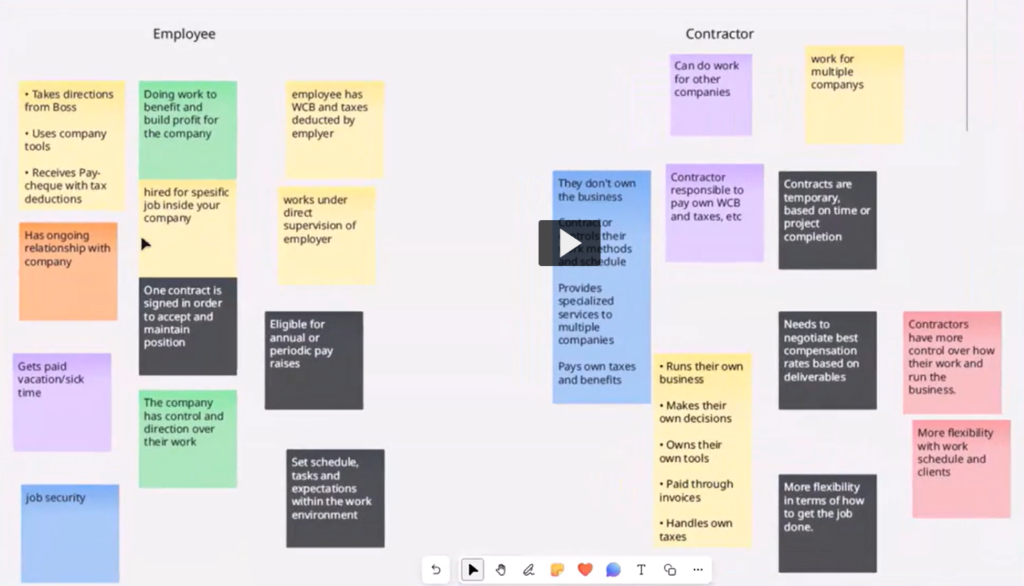
This recorded conversation highlights practical tools and strategies for fostering collaboration and digital literacy in team-based learning environments. Mustafa shares how platforms like Microsoft Whiteboard, Padlet, Blackboard, and Zoom are used to support real-time interaction, peer learning, and inclusive group work. Instructors will find inspiration for engaging learners and supporting diverse teams. Key takeaways include using digital tools to reduce barriers, form learning communities, and empower students to co-create meaningful projects.
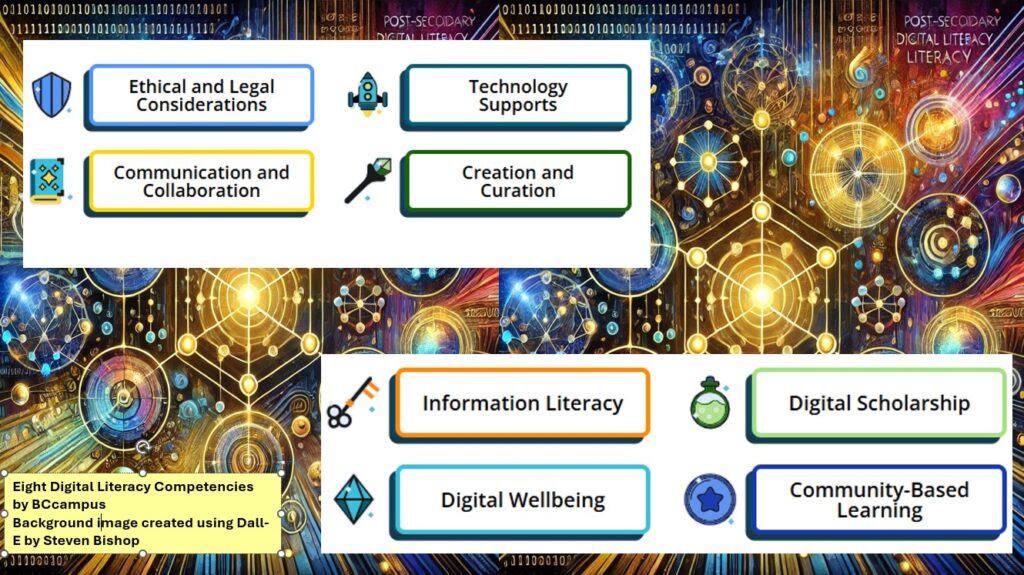
Douglas College supports the adoption of the B.C. Post-Secondary Digital Literacy Framework. This comprehensive guide was developed to enhance digital literacy across British Columbia’s post-secondary institutions. It defines digital literacy and outlines the essential knowledge, skills, and abilities required for effective participation in today’s digital society. The framework emphasizes creating accessible, inclusive, and equitable digital environments for all members of the post-secondary community, including educators, administrators, researchers, staff, and learners.
Here are a few easy-to-implement teaching ideas for each of the eight thematic competencies.
Ethical and Legal Considerations
Cite It Right: Use tools like Zotero for an in-class citation practice activity.
Troubleshooting Practice: Assign a low-stakes task where students solve common technical issues (e.g., fixing Wi-Fi settings or troubleshooting presentation software).
Open Access Exploration: Have students locate and summarize open-access articles using DOAJ or PubMed.
Mini Research Project: Assign students to create a short presentation or paper using Open Textbook Library.
Digital Publication Exercise: Encourage students to create a simple e-book using tools like Pressbooks.
Communication and Collaboration
Professional Email Etiquette: Use OER like (find something here) to teach concise and professional email writing.
Collaborative Brainstorming: Use free tools like Padlet or Microsoft Whiteboard Hypothes.is for group idea-sharing.
Peer Review: Implement structured peer reviews using Microsoft O365 tools or Hypothes.is commenting features.
Creation and Curation
Infographic Creation: Use free templates on Canva for students to visually represent course content.
Podcast Snippet: Have students record a short audio reflection or discussion using Kaltura Capture or Microsoft Stream
Digital Exhibit: Ask students to curate a small online collection of resources or artifacts.
Digital Wellbeing
Mindful Tech Useand Focus Tools: Share resources to teach balanced online habits, and manage distractions. A few Mental Health & Well-Being Smart Phone Apps examples provided by Confederation College.
Reflective Journals: Use OneNote or Blackboard Journals for students to track and reflect on their screen time and digital habits.
Community-Based Learning
Digital Storytelling: Use open guides to create community-focused narratives. If a good fit, introduce students to the Changing Narratives Fund (Canada Media Fund).
Virtual Interviews: Assign students to conduct short, recorded interviews with community members using Blackboard integrated tools like Zoom or Kaltura.
Crowdsourced Projects: Collaborate with local organizations to create a shared resource (find example for here).
BCcampus Digital Literacy Materials for Post-Secondary Educators
Incorporate digital skills into any post-secondary course to equip your students with the ability to exist, contribute, express, critically analyze, and stay healthy in digital spaces.
Instructors, staff, and administrators from Douglas College have been engaging in discussions of the future of digital learning in B.C.’s post-secondary education system. Here are some highlights from 2024 digital literacy events that will directly impact Douglas College and changes being asked of individual college instructors.
Emphasis for ethical, accessible, and responsive use of technology
Establishing a Professional Development Hub – dialogue facilitated by Melanie Latham, TRU
BC Campus Events page is a great place to look for upcoming PD opportunities, and access past event archives. Programs like the Facilitating Learning Online (FLO) series, the EdTech Sandbox series, and the Challenge Series offer training to enhance digital teaching skills.
Here is a good example to consider: 10 GenAI Challenge Series Inspired by the creative approach of the Agora Challenge Bank, BCcampus Open Education challenges, and past digital literacy Twitter challenges, BCcampus is excited to present a series of Generative AI in Education challenges! This open series is designed to build critical literacy around GenAI in a fun, engaging way, helping participants not only develop practical skills but also gain a deeper understanding of GenAI’s transformative potential in higher education. Join us for 10 interactive challenges that will expand your capabilities and critical perspectives on AI in learning! This is a self-paced, asynchronous, not-facilitated challenge series designed by Lucas Wright.
A custom GPT bot designed to help review and reinforce the workshop content
Supporting Digital Literacy Development with Open Educational Resources
The BC Digital Literacy Hub is a public, online collection of Open Educational Resources designed for instructors in post-secondary institutions in British Columbia. The goal is to help educators, including learning and teaching staff, integrate digital literacy materials easily into existing courses and improve their own digital literacy skills. In collaboration with the Ministry of Post-secondary Education and Future Skills, BCcampus developed this collection to support the implementation of the B.C. Post-Secondary Digital Literacy Framework. The collection was created for educators with the support and guidance from educational professionals across the province. Link to recording
The Digital Literacy Challenge was an eight-week asynchronous challenge to help participants expand their digital literacy toolkit. The resources are designed to help incorporate the eight competencies outlined in the B.C. Digital Literacy Framework into teaching practice, and how to support student success through digital literacy.
Enhancing Digital Equity
In the Digital Learning Strategy Forum session titled The Landscape of Merging Modalities and Planning for Multi-Access Learning Pathways, Valerie Irvine of the University of Victoria presented their experiences with merging modalities in the post-secondary classroom. With her method of multi-access learning, Irvine has successfully taught post-secondary students who were learning remotely, on-campus, blended, individually, and in groups. Dr. Irvine encouraged participants to consider the various obstacles to learning, and the different ways minority groups prefer to learn. Read this background article to learn more.
Ethical and Accessible Technology
Mindfulness of ethical and accessible considerations when using educational technology. Mitra Manesh, from the UCLA Center for Mindful Awareness, facilitated a workshop on Mindfulness & Technology on May 15, 2024. Link to notes Mitra provided
Ensuring digital content is accessible to students with disabilities. Please contact the Douglas College Accessibility Services for support with this competency.
Impact on Individual College Instructors
The BC Digital Literacy Framework, Strategy, and ongoing related events are intended to have significant impact on how instructors approach their teaching practices.
Instructors are expected to:
Incorporate Digital Literacy: Integrate digital literacy frameworks into curriculum, and ensure students are well-versed in navigating digital environments.
Participate in Professional Development: Take advantage of professional development opportunities to enhance digital teaching skills and stay current with technological advancements.
Utilize (and contribute) Shared Resources: Use shared educational resources and technology to improve the quality of teaching materials and reduce costs.
Support Digital Equity: Support initiatives that promote digital equity, ensuring all students have access to the necessary digital tools and resources.
Ensure Ethical and Accessible Use of Technology: Be mindful of ethical considerations and ensure their digital content is accessible to all students, including those with disabilities.
By embracing these changes, instructors can contribute to a more inclusive, equitable, and high-quality digital learning environment.