What does it mean to be digitally literate in 2025? For Britt Dzioba, Learning and Teaching Advisor at BCcampus, the answer goes far beyond knowing how to use a computer.
In a recent conversation, Britt reflected on her work with BCcampus and Digital Literacy development and the open-access Digital Literacy Hub—a resource designed to help faculty, students, and communities build the skills needed to thrive in an ever-changing digital environment. She noted that while the tools and platforms may shift rapidly, the underlying competencies—such as information literacy, critical engagement with technology, and digital well-being—remain essential.
The pandemic acted as a “bucket of ice water” moment, forcing faculty and students to adapt quickly to online learning. Since then, technologies like generative AI have added new layers of complexity, raising both opportunities and concerns. “I think technology can be a wonderful thing if used intentionally and if used critically. This is where I think, especially with AI, … it’s so important to keep the human in it…that is how we use AI critically and ethically, by centering human experience.”
From exploring algorithmic literacy to supporting accessibility for neurodivergent learners, Britt emphasizes the importance of slowing down, setting boundaries, and cultivating critical thinking. She sees small, grassroots actions—like community-led digital projects or mindful approaches to teaching and learning—as powerful antidotes to despair in the face of rapid change.
Ultimately, digital literacy is not just about mastering tools. It is about equipping ourselves to respond—rather than react—to change, and to shape technologies in ways that sustain human connection, equity, and wisdom.
We caught up with Sarah Skinner, an Early Childhood Education instructor, about her first year in a full-time faculty role and her evolving approach to inclusive, student-centered teaching. Sarah shares how Universal Design for Learning (UDL) principles, multiple means of expression, and real-world inclusive strategies are shaping her courses—especially in asynchronous online environments.
Sarah reflects on her recent attendance at the Canadian Society for the Study of Education (CSSE) conference and shares a few memorable sessions and takeaways, including using case studies based on refugee families’ lived experiences and incorporating visual note-taking into learning activities. These approaches center student agency and creativity while maintaining clear learning goals.
Key Topics
Sarah’s background in occupational therapy and inclusive education
Visual note-taking as an inclusive and creative learning strategy
Gallery walks as assessment and dialogue tools
Flexible assessments (papers, songs, carvings, videos) that align with consistent learning outcomes
Takeaway Quotes
“Inclusive education is education.” “UDL is about fixed goals and flexible means.” “We’re not just looking for a well-written essay—we’re looking for understanding.” “When students are engaged and joyful, they’re more likely to think for themselves.”
Sarah welcomes collaboration and conversation with other Douglas College instructors who are interested in inclusive teaching, creative assessments, or translating hands-on activities to online environments.
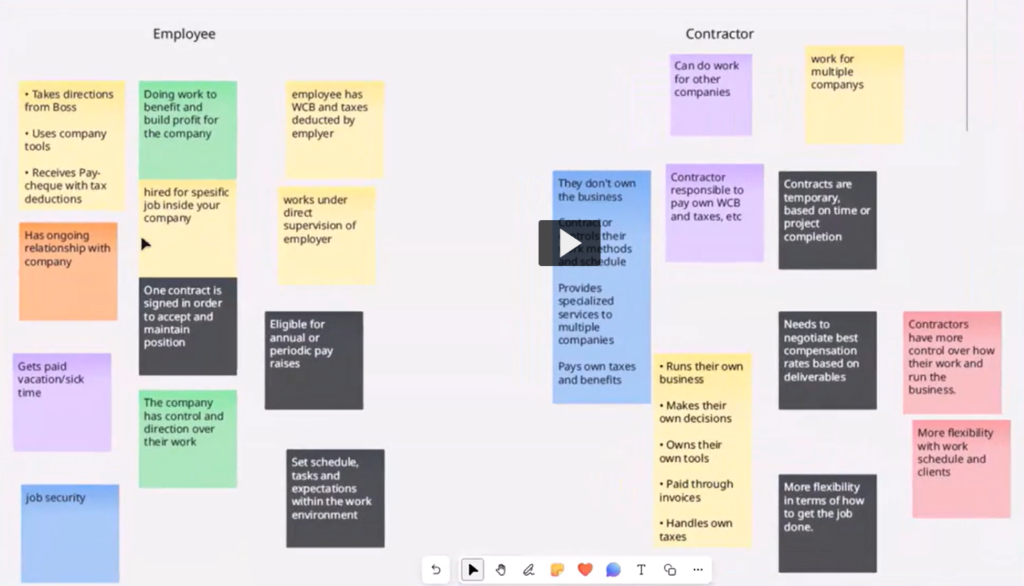
In this follow-up to the DESC Community-Based Learning workshop, Mustafa Syed from the Training Group describes how he uses digital tools and team-based learning approaches to support adult learners—particularly those in self-employment and career-transition programs.
The conversation explores how instructional design grounded in team collaboration, community building, and the BC Post-Secondary Digital Literacy Framework can create real-world outcomes for diverse learners. Drawing on examples from programs like Self-Employment Services, VOICE, and Encore, Mustafa shares how team dynamics, digital skill-building, and collaborative projects foster meaningful communication, promote peer-to-peer engagement, and empower students to connect, share, co-create in dynamic digital environments, and transform their business ideas into action.
This recorded conversation highlights practical tools and strategies for fostering collaboration and digital literacy in team-based learning environments. Mustafa shares how platforms like Microsoft Whiteboard, Padlet, Blackboard, and Zoom are used to support real-time interaction, peer learning, and inclusive group work. Instructors will find inspiration for engaging learners and supporting diverse teams. Key takeaways include using digital tools to reduce barriers, form learning communities, and empower students to co-create meaningful projects.
After three inspiring days at the Digital Pedagogy Lab 2025, which was hosted by BCcampus in partnership with Jesse Stommel and Kwantlen Polytechnic University. I find myself reflecting on what makes teaching and learning meaningful, equitable, and joyful. As I was in the Reimagining Assessment: Care and Community track, the following notes represent topics discussed in that break-out theme, led by Dr. Jesse Stommel and Dr. Martha Burtis. (Note: Paraphrased quotes from the track are in italics.)
Across conversations on grading reform, first-generation student success, and digital learning environments, a central theme emerged:
Assessment should not be a barrier to learning—it should be a bridge.
When we shift our focus from grades to growth, from compliance to curiosity, we create classrooms where students engage deeply, take intellectual risks, and connect learning to their own lives. We explored research-backed strategies and practical applications to bring into our own teaching practices.
First-Generation Students: Making Learning Purposeful
One of the most impactful discussions centered on first-generation students, who often approach college with a transactional view of education—where grades, rather than learning, are seen as the goal. Research on cultural capital gaps shows that these students may struggle with unspoken academic expectations, leading to anxiety and disengagement.
Practical applications to teaching
Explicitly teach the hidden curriculum—Explain policies, feedback loops, and flexible deadlines.
Reframe grades as markers of growth—Help students see assignments as opportunities for learning, not just evaluations.
Build relational trust—Normalize asking for help and emphasize process over perfection.
Grades shouldn’t define a student’s worth—but for many, they’re tied to survival.
Classroom Environment: The Space We Teach In Matters
Classroom design influences engagement, equity, and participation in ways we often overlook. We had a lively discussion about how seating arrangements, lighting, and instructor positioning impact student interactions.
A few takeaways:
Fixed seating and sterile environments discourage engagement.
Flexible arrangements encourage discussion, collaboration, and accessibility.
Instructor positioning matters—sitting among students reduces hierarchy and increases participation.
If we want students to be active learners, we need spaces that allow them to be.
Since this was a digital pedagogy lab, we also discussed the implications of digital environments, and ways to reduce hierarchical and sterile online environments.
Bias in Grading: The Halo Effect & Hidden Prejudices
Grading is never neutral. A meta-analysis of 1,935 graders found that bias—often unconscious—shapes how we evaluate student work.
Common biases in grading:
The Halo Effect – If a student has done well before, their future work may be viewed more favorably.
The Reverse Halo Effect – Students who challenge grades or struggle early on may be judged more harshly.
Bias from transcript access – Knowing a student’s GPA, financial aid status, or past performance can subtly influence assessment.
How to Reduce Grading Bias:
Blind grading – we discussed the pros and cons of this, and the ways in which bias can creep into even blind grading
Shift from “points lost” to mastery-based rubrics.
Provide feedback before giving a grade. Also, keep feedback and grading separate; students often don’t consider the feedback important if it is adjacent to the grade.
Bias in grading isn’t just about race or gender—it’s about power, perception, and relationships.
Shifting from Grades to Meaningful Feedback
One of the most practical insights from the Assessment track was how to decenter grades and make feedback the focal point of learning.
Effective feedback strategies:
Process letters – Students reflect on their work before receiving a grade.
Self-assessment + instructor feedback – Encourages students to take ownership of their progress.
Feedback-first grading – Delays grading to allow students to focus on improvement rather than points.
When grades are the focus, students ignore feedback. When feedback is the focus, grades become secondary.
Redesigning Assignments for Intrinsic Motivation
A final, critical discussion centered on how we design assignments to spark curiosity and intrinsic motivation.
Practical strategies:
Reframe assignments – Instead of “This is worth 20% of your grade,” say: “This helps you develop X skill, which prepares you for Y challenge.”
Use mastery-based grading – Encourage students to improve over time rather than chase perfection.
Incorporate self-reflection – Ask students to set learning goals and evaluate their own growth.
Education isn’t about sorting students into winners and losers—it’s about empowering every learner to thrive.
A Call to Action: Redefining Success in the Classroom
Grading reform isn’t just about changing policies—it’s a philosophical shift. It asks us:
Do my assessments foster learning or just compliance?
Do my grading practices reflect my values or institutional habit?
Am I creating conditions where all students—not just the privileged—can thrive?
Teaching should be a space of intellectual excitement, deep engagement, and genuine curiosity. The more we humanize assessment, remove unnecessary barriers, and promote student agency, the more we create joyful, meaningful learning experiences.
I left this conference energized and committed to these shifts—not just for my students, but for the future of teaching and learning itself.
Because education is more than a transcript—it’s about transformation. And when we shift our focus from grades to growth, we empower students to become thinkers, not just performers.
Resources we used in the Reimagining Assessment track
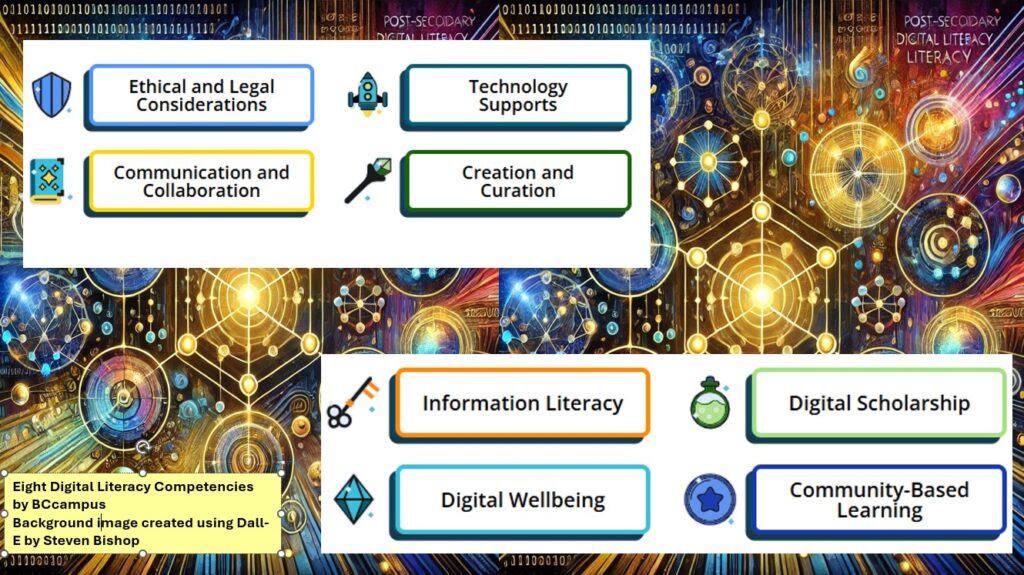
Douglas College supports the adoption of the B.C. Post-Secondary Digital Literacy Framework. This comprehensive guide was developed to enhance digital literacy across British Columbia’s post-secondary institutions. It defines digital literacy and outlines the essential knowledge, skills, and abilities required for effective participation in today’s digital society. The framework emphasizes creating accessible, inclusive, and equitable digital environments for all members of the post-secondary community, including educators, administrators, researchers, staff, and learners.
Here are a few easy-to-implement teaching ideas for each of the eight thematic competencies.
Ethical and Legal Considerations
Cite It Right: Use tools like Zotero for an in-class citation practice activity.
Troubleshooting Practice: Assign a low-stakes task where students solve common technical issues (e.g., fixing Wi-Fi settings or troubleshooting presentation software).
Open Access Exploration: Have students locate and summarize open-access articles using DOAJ or PubMed.
Mini Research Project: Assign students to create a short presentation or paper using Open Textbook Library.
Digital Publication Exercise: Encourage students to create a simple e-book using tools like Pressbooks.
Communication and Collaboration
Professional Email Etiquette: Use OER like (find something here) to teach concise and professional email writing.
Collaborative Brainstorming: Use free tools like Padlet or Microsoft Whiteboard Hypothes.is for group idea-sharing.
Peer Review: Implement structured peer reviews using Microsoft O365 tools or Hypothes.is commenting features.
Creation and Curation
Infographic Creation: Use free templates on Canva for students to visually represent course content.
Podcast Snippet: Have students record a short audio reflection or discussion using Kaltura Capture or Microsoft Stream
Digital Exhibit: Ask students to curate a small online collection of resources or artifacts.
Digital Wellbeing
Mindful Tech Useand Focus Tools: Share resources to teach balanced online habits, and manage distractions. A few Mental Health & Well-Being Smart Phone Apps examples provided by Confederation College.
Reflective Journals: Use OneNote or Blackboard Journals for students to track and reflect on their screen time and digital habits.
Community-Based Learning
Digital Storytelling: Use open guides to create community-focused narratives. If a good fit, introduce students to the Changing Narratives Fund (Canada Media Fund).
Virtual Interviews: Assign students to conduct short, recorded interviews with community members using Blackboard integrated tools like Zoom or Kaltura.
Crowdsourced Projects: Collaborate with local organizations to create a shared resource (find example for here).
BCcampus Digital Literacy Materials for Post-Secondary Educators
Incorporate digital skills into any post-secondary course to equip your students with the ability to exist, contribute, express, critically analyze, and stay healthy in digital spaces.
Instructors, staff, and administrators from Douglas College have been engaging in discussions of the future of digital learning in B.C.’s post-secondary education system. Here are some highlights from 2024 digital literacy events that will directly impact Douglas College and changes being asked of individual college instructors.
Emphasis for ethical, accessible, and responsive use of technology
Establishing a Professional Development Hub – dialogue facilitated by Melanie Latham, TRU
BC Campus Events page is a great place to look for upcoming PD opportunities, and access past event archives. Programs like the Facilitating Learning Online (FLO) series, the EdTech Sandbox series, and the Challenge Series offer training to enhance digital teaching skills.
Here is a good example to consider: 10 GenAI Challenge Series Inspired by the creative approach of the Agora Challenge Bank, BCcampus Open Education challenges, and past digital literacy Twitter challenges, BCcampus is excited to present a series of Generative AI in Education challenges! This open series is designed to build critical literacy around GenAI in a fun, engaging way, helping participants not only develop practical skills but also gain a deeper understanding of GenAI’s transformative potential in higher education. Join us for 10 interactive challenges that will expand your capabilities and critical perspectives on AI in learning! This is a self-paced, asynchronous, not-facilitated challenge series designed by Lucas Wright.
A custom GPT bot designed to help review and reinforce the workshop content
Supporting Digital Literacy Development with Open Educational Resources
The BC Digital Literacy Hub is a public, online collection of Open Educational Resources designed for instructors in post-secondary institutions in British Columbia. The goal is to help educators, including learning and teaching staff, integrate digital literacy materials easily into existing courses and improve their own digital literacy skills. In collaboration with the Ministry of Post-secondary Education and Future Skills, BCcampus developed this collection to support the implementation of the B.C. Post-Secondary Digital Literacy Framework. The collection was created for educators with the support and guidance from educational professionals across the province. Link to recording
The Digital Literacy Challenge was an eight-week asynchronous challenge to help participants expand their digital literacy toolkit. The resources are designed to help incorporate the eight competencies outlined in the B.C. Digital Literacy Framework into teaching practice, and how to support student success through digital literacy.
Enhancing Digital Equity
In the Digital Learning Strategy Forum session titled The Landscape of Merging Modalities and Planning for Multi-Access Learning Pathways, Valerie Irvine of the University of Victoria presented their experiences with merging modalities in the post-secondary classroom. With her method of multi-access learning, Irvine has successfully taught post-secondary students who were learning remotely, on-campus, blended, individually, and in groups. Dr. Irvine encouraged participants to consider the various obstacles to learning, and the different ways minority groups prefer to learn. Read this background article to learn more.
Ethical and Accessible Technology
Mindfulness of ethical and accessible considerations when using educational technology. Mitra Manesh, from the UCLA Center for Mindful Awareness, facilitated a workshop on Mindfulness & Technology on May 15, 2024. Link to notes Mitra provided
Ensuring digital content is accessible to students with disabilities. Please contact the Douglas College Accessibility Services for support with this competency.
Impact on Individual College Instructors
The BC Digital Literacy Framework, Strategy, and ongoing related events are intended to have significant impact on how instructors approach their teaching practices.
Instructors are expected to:
Incorporate Digital Literacy: Integrate digital literacy frameworks into curriculum, and ensure students are well-versed in navigating digital environments.
Participate in Professional Development: Take advantage of professional development opportunities to enhance digital teaching skills and stay current with technological advancements.
Utilize (and contribute) Shared Resources: Use shared educational resources and technology to improve the quality of teaching materials and reduce costs.
Support Digital Equity: Support initiatives that promote digital equity, ensuring all students have access to the necessary digital tools and resources.
Ensure Ethical and Accessible Use of Technology: Be mindful of ethical considerations and ensure their digital content is accessible to all students, including those with disabilities.
By embracing these changes, instructors can contribute to a more inclusive, equitable, and high-quality digital learning environment.
A conversation recorded from Douglas College, on the unceded traditional and ancestral lands of the Coast Salish Peoples, including the territories of the q̓íc̓əy̓ (Katzie), qʼʷa:n̓ƛʼən̓ (Kwantlen), kʷikʷəƛ̓əm (Kwikwetlem), xʷməθkʷəy̓əm (Musqueam), and qiqéyt (Qayqayt) First Nations, and from Thompson Rivers University on the Tk’emlúps te Secwépemc (Kamloops campus) and the T’exelc (Williams Lake campus) within Secwépemc’ulucw, reside on the traditional and unceded territory of the Secwépemc.
As a participant midway through the BC Campus 2024 Digital Literacy Challenge Series, I was delighted to have a chance to chat with the creators, Helen Lee and Melanie Lathan.
Helen Lee, Instructional Designer at Justice Institute of BCMelanie Latham, Coordinator, Educational Technologies, Thompson Rivers University
The series takes participants through the eight competencies outlined in the B.C. Digital Literacy Framework, and includes strategies for incorporating the skills into teaching practice, and how to support student success through digital literacy.
Participants receive one challenge in their inbox each Monday morning over the course of eight weeks. Each challenge will address the following:
What: a definition of the digital literacy competency
Why: the importance of each competency in teaching practice
How: approaches for developing the competency in our own learning, and how to incorporate these skills in our teaching practice
Interactive activities and thoughtful prompts help to learn how to incorporate digital literacy into your teaching practice and generate ideas on how to teach these skills to students. Each weekly challenge takes one to four hours to complete, depending on how deeply you want to explore.
There were four optional, synchronous drop-in sessions held over Zoom where participants asked questions and connected with peers in a casual setting.
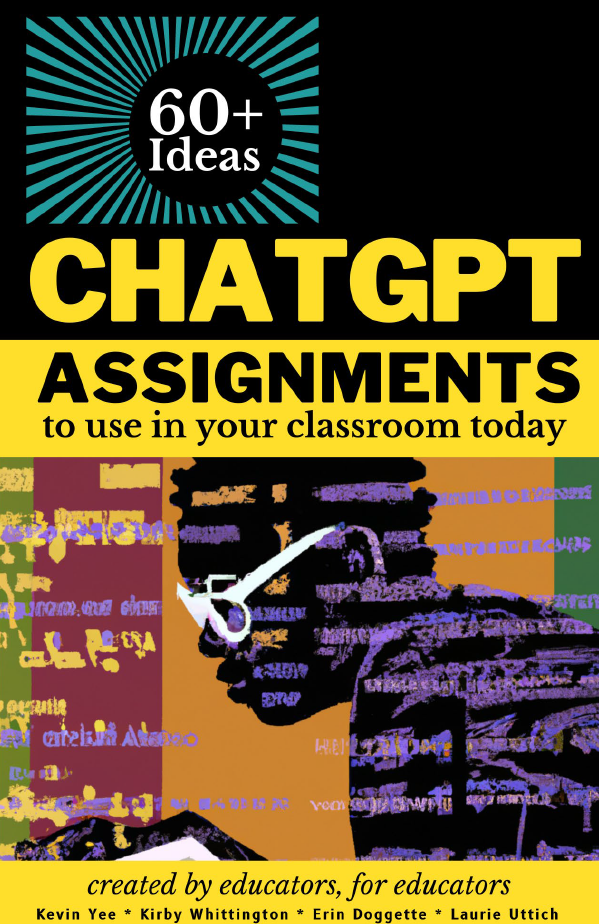
As part of DESC’s ongoing work to provide resources to educators across Douglas College, we provide the following Creative Commons licenced book from the University of Central Florida on creating assignments that incorporate AI chat tools such as ChatGPT. These would also work with the Douglas College access to Microsoft’s BING AI chat through our Office 365 account.
Reference:
Yee, Kevin; Whittington, Kirby; Doggette, Erin; and Uttich, Laurie, “ChatGPT Assignments to Use in Your Classroom Today” (2023). UCF Created OER Works. 8.
Join your peers from across Douglas College as we share “Stumbling Blocks and Stepping Stones”: a monthly series celebrating our struggles and successes in teaching and learning.
Moderated by Tim Paul, Manager, Academic Technology Services and member of Douglas Educational Support Community (DESC), “Stumbling Blocks and Stepping Stones” is structured around 3 short faculty presentations and an optional 30-minute discussion time. Developed under the philosophy of professional development through collegial sharing, we hope that the experience of others will help you to find community, creativity, and the strength to explore new opportunities.
Theme: AI in the Classroom: Educator Experiences and Classroom Guidelines
Date: Tuesday, November 14
Time: 10:35-11:30 am
Our panelists will be:
Jim Palmer (Music, LLPA)
Nina Blanes (BSN, HS)
Doug Beech (Marketing, CBA)
In this session, our panelists will provide examples of how AI is utilized (and not utilized) in their classrooms, shedding light on their approaches to communicating with students about the responsible use of generative technology. Gain valuable insights and practical inspiration for your own teaching methods in this session.
Instructors may not submit student material to AI Detectors: Terms and Conditions require ownership over the intellectual property that is submitted; Students own their IP, not instructors.
“By accessing and/or using the site or services for any purpose whatsoever, you agree to the collection and use of any information or documents uploaded to the site or services, in addition to the collection of your personal information, all in accordance with these terms and under our privacy policy. Unless you delete any uploaded documents from Copyleaks’ servers in accordance with our privacy policy, we reserve the right to keep such uploaded documents in a data-base and use such documents for all purposes listed in our privacy policy.”
Student work may not be submitted to AI detectors without their consent: Students have the right to know if their material is being submitted to a third-party (who may profit off their IP) and the right to withhold consent (Rosenfeld v. McGill, 2004).
At Douglas College, you are required to get consent from a student before submitting their work to any third-party site that has not been properly vetted.
Students must be able to opt out without penalty.
“Detectors” don’t work as advertised: Open AI recently admitted this by pulling its own “detector”; Beware of the “Appeal to Statistics” Fallacy